 Mobility & Time Tracking for the Construction Industry
Mobility calculations and time tracking that are always accurate.
PC 124 compensation and hours worked, automatically calculated from departure to arrival at the job site.
- PC 124 Mobility Allowance — calculated automatically.
- Time tracking from departure to the job site — no paperwork.
- Driver Identification — Every Ride Goes to the Right Person.
Thanks!
We'll contact you within 1 business day.
In the meantime? Discover all our solutions for the construction industry →
Accurately calculating mobility starts with knowing who drove where.
The mobility allowance in PC 124 depends on distance, vehicle, and driver. AllConnects brings these three factors together—automatically, verifiably, and ready for payroll processing.
Automatic PC 124 Calculation
The starting point, pickup location, and fare are automatically converted to the correct mobility reimbursement. No more manual mileage reports.
Valid Driver Identification
Each trip is linked to the correct person via a badge, key, or app. This ensures that not only the trip is accurate, but also the reimbursement and the hours.
Time tracking included
Hours worked and travel time in a single system—ready for use in payroll, invoicing, and post-project cost analysis.
In addition to construction sites, general working-hour tracking requirements are also becoming stricter: these will soon apply to every employee—not just those on construction sites. You’re already prepared with comprehensive time and mobility tracking. Read about what’s changing in 2027 →
One central platform for all your construction site activities
You start with mobility and time tracking—but AllConnects grows with you. You can manage attendance, your fleet, and equipment all from the same platform. No separate systems—just one overview.
Mobility & HR
PC 124 Mobility Calculation & Time Tracking — automatically from departure to the job site.
Attendance
Check in at work via a time clock, vehicle, or app. Comprehensive tracking of employees and subcontractors.
Equipment
Asset tracking and theft protection for machinery, containers, and tools.
Fleet
GPS Tracking & Driving Behavior of Delivery Vans. Lower Fuel Consumption, Greater Control Over Your Fleet.

From movements on the track to accurate numbers
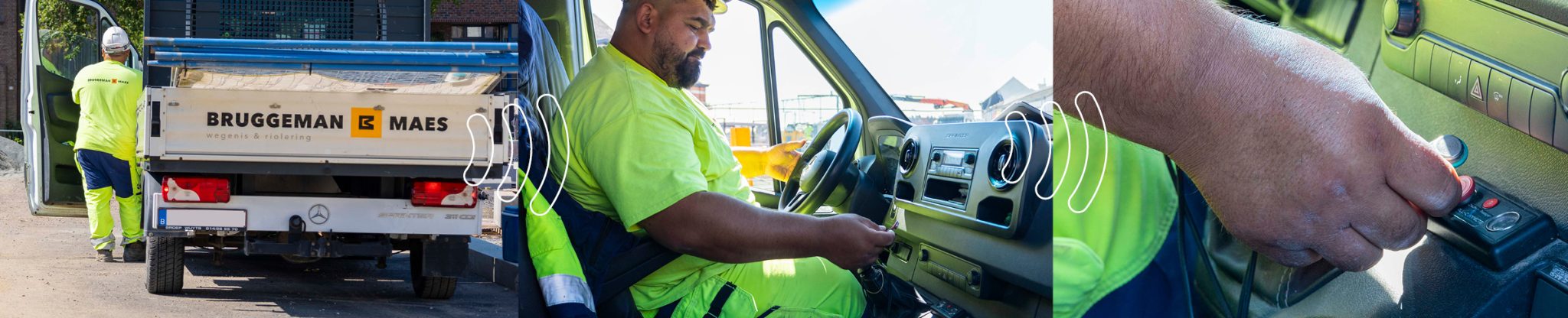
Every trip between the departure point and the job site is automatically recorded and linked to the correct driver. The result is an accurate mobility allowance and a complete timesheet—without any manual work.

"Tell me briefly how you currently track mobility and hours—I'll show you in 15 minutes exactly how much AllConnects can save you. No obligation."
Frequently Asked Questions
How does AllConnects calculate the mobility allowance for PC 124?
Based on the starting point, the job site address, and the applicable rate, the distance is automatically converted to the correct mobility allowance—per trip, per day. This eliminates the need to manually track mileage logs and avoids any disputes afterward.
Why is driver identification necessary?
The mileage allowance and the time worked depend on who was driving, not just on which vehicle was in motion. By linking each trip to the correct person—via a badge, key, or app—not only is the trip recorded accurately, but so are the mileage allowance and the time sheet.
Can I combine this with time and attendance tracking (Checkinatwork)?
Yes. Mobility, time tracking, and Checkinatwork all run on the same platform. You start with what’s most pressing today and expand later—without having to use a second system alongside the first.
In what ways can a driver identify themselves?
Via a badge, a key (Dallas key), RFID, or the app—whichever works best for your team and your vehicles. That way, your team doesn't have to keep track of anything extra.
What does it cost?
The price depends on the number of vehicles, users, and locations. Request a no-obligation mobility assessment—you’ll receive a specific, customized estimate.

Free white paper
Compliance with legal requirements at the shipyard by 2027
Checkinatwork, check-in and check-out, mobility (PC 124), time tracking, and labor inspections—all clearly laid out, without legal jargon. Find out what’s changing and what you need to be aware of right now.
You'll receive the PDF right away via email. No spam—you can unsubscribe at any time.
Thank you! You'll find the white paper in your inbox. In the meantime, keep reading →
Curious to see what AllConnects can do for your mobility?
Request a free mobility assessment. You’ll get a clear picture of what aspects of your billing and time tracking you can automate—with no obligation and a response within 1 business day.
Request a free mobility assessment