


As a construction worker in PC 124, you’re entitled to a mileage allowance for the miles you drive each day. But did you know that the way you clock in using the company vehicle directly determines how many miles appear on your pay stub—and at what rate? In this article, we explain all 8 clock-in scenarios.
The LIVE.connect badge system automatically records daily work-related travel: the actual distance traveled, the role (driver or passenger), and the start and end points of the trip. This data is sent directly to payroll.
How does the badge system work in the company car?
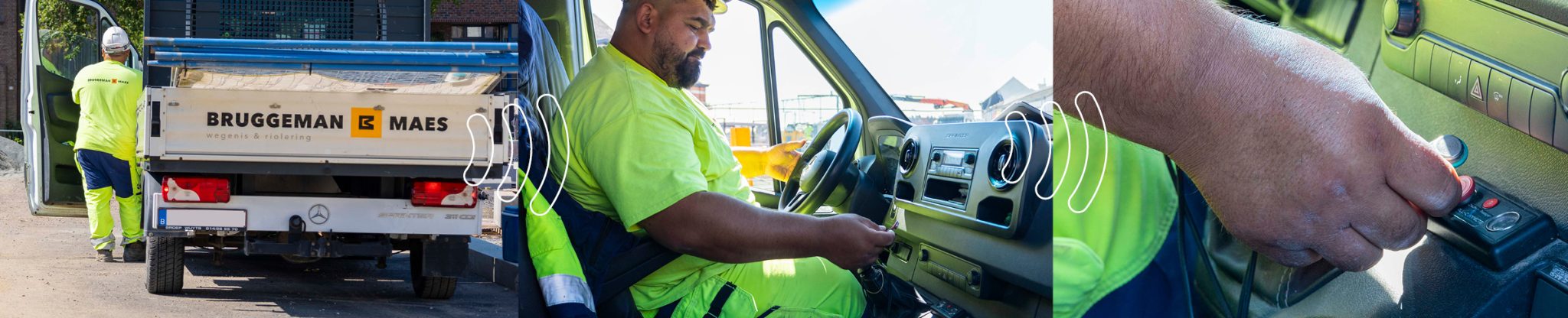

You use a Dallas key to clock in—a small iButton chip that you hold up to the reader inside the vehicle. The system immediately recognizes who is getting in and records the start or end of a trip. Some drivers use a black key: one key for both IN and OUT. Others use a red-green combination —green to start, red to end. That set comes with a handy lanyard, so both keys always stay together on your keychain.
LIVE.connect automatically records who is in the vehicle (via the LEFT/RIGHT badge), where the trip starts and ends, and how many kilometers are traveled each day. The badge procedure therefore literally determines what appears on your pay stub.
Do you have questions about rates, driver-passenger rules, or specific situations?
Scenario 1 — The traditional site day: 1 supervisor, multiple sites
The situation: An employee leaves his home in the company car, drives to two job sites, and returns in the evening.

The system records the total distance traveled each morning from the employee’s home to Site A, then to Site B, and back to the employee’s home in the evening. Since the employee drives a company vehicle alone, they are subject to the driver-only rate—5% higher than the passenger rate, with a minimum threshold of 10 km per day.
Scenario 2 — Personal transportation to the construction site
The situation: The employee drives his or her own vehicle to the worksite and back home. A company vehicle is available at the worksite.

Miles traveled by private vehicle (home → job site) are not included in the company vehicle log and are reimbursed separately through the travel allowance for personal transportation. The distance between the employee’s home and the job site was calculated in advance and applied when the employee swiped their IN&OUT badge while in the company vehicle at the job site.
Scenario 3 — The driver picks up a passenger along the way
The situation: The driver leaves home in a company vehicle and picks up a colleague along the way (at home or at a parking lot). After the last job site, the passenger is dropped off at home or at a parking lot, and the driver drives home.

Once the passenger has been registered via the RIGHT badge, the system recognizes the driver as a driver with passengers. The mobility rate then applies to the entire trip for that day—including the portion that the driver drove alone. This is the highest mobility reimbursement rate and applies from the first kilometer—with no minimum threshold of 10 km.
"For years, our drivers were transporting passengers without that being recorded. It wasn't until we implemented AllConnects' badge system that we were able to prove they were entitled to the higher rate—and our payroll records were finally in order."Site Manager, Construction Company in the East Flanders Region
LIVE.connect automatically calculates all these scenarios—ensuring the correct rate, every day.
Scenario 4 — Drive to the depot/company in a company vehicle; then to a construction site; home in the evening
The situation: The driver of a company vehicle leaves home to go to the depot or company to work or load up, and then drives on to one or more job sites. In the evening, he drives straight home.

The total daily distance from home → depot → job site → home is calculated. If you only stop at the depot to load up and leave within 15 minutes, the OUT-IN is not counted, and the commute is automatically recorded as from home to the job site. If you stay longer than 15 minutes, that time is counted as work time.
Scenario 5 — Private transportation to the depot, clock-in, company vehicle to the job site and back to the depot
The situation: The employee arrives at the depot/company in his or her own vehicle and clocks in. He or she then leaves for the job site in a company vehicle and returns to the depot/company at the end of the workday to drive home in his or her own vehicle.
Mobility tracking for company vehicles begins at the depot. The miles driven for personal travel from home to the depot are reimbursed separately. The time clock records working hours; the badge records mobility miles—two separate systems that must be synchronized.
Scenario 6 — Private transportation and clock-in at the depot, company vehicle to the job site, end of day at an off-site parking lot
The situation: The employee arrives at the depot/company in his own vehicle and clocks in. He then leaves for the job site in a company vehicle. At the end of the workday, he does not return to the depot/company but parks the company vehicle at a parking lot along the way.
The "OUT" badge in the parking lot concludes the mobility log for the company vehicle. The mileage from the depot to the job sites and then to the public parking lot is correctly included in the daily mileage. The return trip home using personal transportation is not included in the company vehicle log.
Scenario 7 — Private transportation and clock-in at the depot, company vehicle to the job site, end of the day at home
The situation: The employee arrives at the depot/company in his own vehicle and clocks in. He then drives to the job site in a company vehicle. At the end of the workday, he does not return to the depot/company but drives home in the company vehicle.
The system calculates the distance from the depot to the job site and back to home. The total daily distance therefore includes the morning commute (depot to job site) and the evening commute (job site to home). Both are included in the calculation of the mobility allowance.
Scenario 8 — Assembly point as the starting and ending point of the workday
The situation: Employees drive their own vehicles to the depot/company/carpool parking lot. The company vehicle departs from there for the job site and returns to the starting location in the evening.
The company car’s mileage log covers the route from the carpool location to the worksite and back. The miles employees travel from home to the carpool location using their personal vehicles are not included in the company car’s mileage log and are reimbursed separately. The driver is considered to be transporting passengers for the entire trip.
Conclusion: Correct badge = Correct reimbursement
LIVE.connect calculates mobility allowances fully automatically based on badge transactions. The system knows who the driver is, who the passenger is, how many kilometers were traveled each day, and what the correct rate is. But the system is only as good as the data it receives.
Badge works correctly in every scenario, and the commuting allowance is calculated automatically—every month, for every employee.
Frequently Asked Questions
-
Use the green Dallas key to check in the vehicle (start mobility). Use the red Dallas key to check out (stop mobility). Both keys are held against the mobility panel: the left button is for the driver, and the right button is for the passenger(s).
-
The left button is for the driver. The right button is for the passenger(s). The driver always uses the left button; the passenger uses the right button. This distinction determines the rate: driver with passengers = highest rate (€0.1579/km, no minimum threshold), driver without passengers = 5% above rate B (min. 10 km/day), passenger = rate B (min. 10 km/day).
-
If a passenger swipes their badge within 15 seconds of the driver swiping theirs, both are considered to have departed at the same time. This also applies in scenario 2 (driving one’s own car to the worksite), where the employee swipes their badge IN and OUT within 15 seconds while in the company vehicle at the worksite to record their morning or evening commute.
-
If the passenger forgets to scan their badge, the system will record the driver as driving without passengers, which results in a lower fare. The driver will then receive less than what they are entitled to as a driver with passengers. Always check that the passenger has scanned their badge before departure. If this happens by mistake, contact HR for a manual correction.
-
If you only stop by the depot/company to load up and leave within 15 minutes, the OUT-IN is not recorded, and the mobility log automatically continues from your home to the job site. If you stay on site for longer than 15 minutes, that time is counted as work time.
-
The tracking system uses GPS data combined with badge check-in/check-out events. The green key marks the start of a trip; the red key marks the end. The system calculates the actual driving distance (not as the crow flies) between the two points and links it to the user’s badge profile.
Do you have questions about your employees' specific mobility situation?
Please contact the AllConnects team—we’d be happy to help you find a solution.


Hilde Lavrijssen
Marketing Manager — AllConnects BV
Hilde closely follows Belgian legislation on mobility, fleet management, and time tracking and translates it into practical insights for companies in the transportation industry.
